
The Eisenhower matrix sorts tasks by two questions, urgent and important, into four boxes: do, schedule, delegate and delete. Run it weekly against goals you have written down. Then write next to each item what it gets you, because urgency alone pulls people toward the task that pays less.
The four quadrants
Important means it moves one of your goals, or it is part of your job that only you can do. Urgent means something real goes wrong if it waits until next week.
- Urgent and important: do it now. A bug customers can see, or a contract that has to be signed today.
- Important, not urgent: schedule it. The work on your goals, and the planning and training behind them. Give it a day and a start time.
- Urgent, not important: delegate it. The request needs an answer soon, but not your answer.
- Neither: delete it. Decline it or take it off the list.
Left alone, the two urgent boxes fill the week. The schedule box is where goals move, and nothing in it asks for your attention until its deadline is near. That is why the do box never empties: part of it is important work from earlier weeks that never got a block. Booking the schedule box is how the do box shrinks.
Where the matrix comes from
In a 1954 speech in Evanston, Illinois, Dwight D. Eisenhower quoted a former college president: “I have two kinds of problems, the urgent and the important. The urgent are not important, and the important are never urgent.”
The speech has no grid. The four boxes appear in Stephen Covey’s The 7 Habits of Highly Effective People (1989), where important and not urgent is quadrant 2.
How to use it on a real week
Do this once a week, as part of your weekly planning, so the boxes are set before Monday.
- Write your goals at the top: two or three for this quarter, taken from your goals for the year. Importance is judged against them, and without them every task feels important.
- List the coming week: your task list, plus every request waiting in your inbox.
- Ask the two questions of each item and put it in a box. If you hesitate on urgent, the answer is no.
- Clear the two not-important boxes first. Delete what you can, then hand off what you can.
- Book every item in the schedule box as a calendar block with a start time. The time-blocking guide shows how to size the blocks and protect them.
If most of the list lands in do, ask again what really goes wrong if each item waits a week.
In one week I sorted about 35 items: roughly 8 do now, 12 schedule, 5 delegate and 10 drop. Asking what breaks if a task waits a week moved about 5 of the 8 do-now items out, and most of them just felt urgent. Some of my delegate items now go to AI or automations instead of people.
Hand each delegate item off in one message: who does it, the result you need, by when, and when you will check. Working alone, you can still delegate to a freelancer, or answer in two lines and move on.
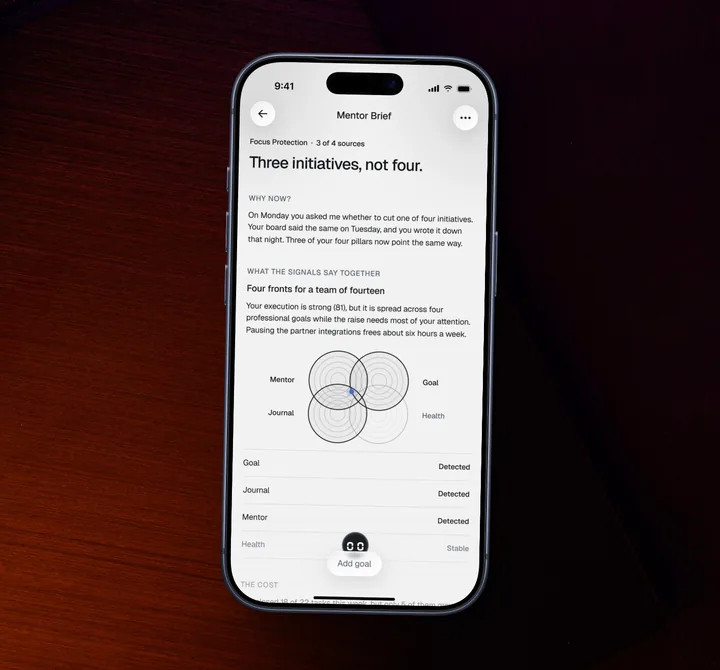
At the end of the week, look at the schedule box: an item whose block was taken by something urgent goes first next week, at a time when fewer requests arrive. If the same item loses its block three weeks running, the list is not the problem: there are more goals than weeks. In FocusPilot, a Mentor Brief arrives when your goals, journal and recent days point to the same problem, and it names what to cut (how it works).
Urgency wins even when it pays less
Urgent work arrives with a sender and a deadline someone else set. Important work that is not urgent has neither, so nobody asks about the hiring plan until the team is short.
In five experiments by Zhu, Yang and Hsee, people picked a lower-paying task over a better-paying one when the lower-paying one only looked urgent, for example because it seemed about to expire. An independent team repeated the study with 2,374 people in 2026: extra controls made the effect smaller, and it held in every test.
The original paper also tested a remedy. In one experiment with 402 online workers, a one-line reminder of what each task paid, shown at the moment of choosing, cut the share who took the urgent, lower-paying task from 33.7 to 20.6 percent. People who saw themselves as busy were more prone to the effect.
These were small tasks paid in cents, and none of the studies tested the grid; we found no study of the matrix itself. The move they point to is cheap, and it is one line added to step 3: next to each item, write what it gets you if it is done this week, and what breaks if it waits.
Writing down what a task actually gets me makes me drop the low-value ones. When I am stressed or in “just execute” mode I skip that step, and that is when I waste time on things I should have automated or cut.
A worked example
Ada, our demo account, leads product at a fintech company. Her goals this quarter: ship the new onboarding flow, plan the team offsite in Lisbon, and run a half marathon in March.
She sorted ten items and wrote a payoff line next to each. The QA pass on Android had sat on her list for two weeks, because the requests reached her first every morning. Its line read “keeps the release date; if it waits a week, the date slips”. The line for the metrics slides read “the analyst’s version would do”.
Ada’s week, sorted on Monday
- Payment bug a customer reported this morning (Important, Urgent: Do now)
- Venue hold in Lisbon, expires Thursday (Important, Urgent: Do now)
- QA pass on AndroidTue and Thu, 9:00-11:00 (Important, Not urgent: Schedule)
- First draft of the offsite agendaWed, 14:00-15:30 (Important, Not urgent: Schedule)
- Two training runs and a long runMon and Wed 7:00, Sat 8:00 (Important, Not urgent: Schedule)
- Custom demo for a sales lead on Fridayto the solutions engineer (Not important, Urgent: Delegate)
- Metrics slides for Tuesday’s leadership meetingto the analyst (Not important, Urgent: Delegate)
- Feedback on the new icon set, asked for three timesto the design lead (Not important, Urgent: Delegate)
- Partnership pitch from a vendordeclined in two lines (Not important, Not urgent: Delete)
- A competitor’s release notes (Not important, Not urgent: Delete)
She booked the three schedule items before opening Slack and handed off the three requests, one message each. To the analyst: the metrics slides by 17:00 that day, checked by Ada at 8:30 on Tuesday, before the leadership meeting. By Thursday the QA pass was done, and the onboarding flow kept its release date.
Example data from a demo account. Names and numbers are illustrative.
Template
My goals this quarter
This week’s matrix
| Urgent | Not urgent | |
|---|---|---|
| Important | Do now: | Schedule, with a day and start time: |
| Not important | Delegate, to whom and by when: | Delete: |
Four questions for every item
- What does it get me if it is done this week?
- What breaks if it waits until next week?
- Does it move one of my goals, or is it work only I can do?
- Who else could do it?
Where the matrix falls short
The matrix sorts. It does not size the work or find time for it, and “important” is only as good as the goals written above it. When everything left is important to the same goal, the grid stops helping: rank the items by their payoff lines, or pick one for the day. A team can still run it on its incoming requests: sort them together in the weekly meeting, against the team’s goals written at the top, so every delegate item leaves with one owner and every schedule item with a day. For a team choosing between projects, an impact and effort matrix fits better, because it weighs what each project costs.
You do not need an app for this. A sheet of paper folded into four does the whole method, and if your list already lives in Todoist, its four priority levels, P1 to P4, can stand in for the boxes.
Use the matrix with FocusPilot
FocusPilot does not draw the matrix. It holds the goals you judge importance against, and it books the schedule box.
- Write the goals the matrix is judged against: + button, Goal, with a deadline and an area (Professional, Personal or Health).
- Book each schedule-box item as a task under its goal, with a day, a start time and a length.
- Talk a hand-off you are unsure about through with Mentor (+ button, Ask Mentor), which knows your goals, your journal and your recent days.
- When your goals, journal and recent days point to the same overload, a Mentor Brief arrives (+ button, Mentor Brief) and names what to cut. It is the delete box applied to goals, at most eight times a month.
FocusPilot is free to download on iPhone and Android, and every plan starts with a free trial.

FocusPilotiPhone and Android


We make FocusPilot. The method above works without it.
The bottom line
Run the matrix once a week, on paper or in any list, and spend most of the time on the payoff lines. If the schedule box stays unbooked three weeks running, shorten the goal list.


