
This guide shows you how to read the FocusPilot Focus Score on the Insights tab, find the part that held a day down, and change what it measures. It also walks through the sections under the score.
Open Insights and choose a timeframe
Insights is the fourth tab. The control at the top right sets the timeframe for the whole tab: This week, This month or This year. Every section follows that choice, so no card has a range of its own.
Tap any bar on a chart to read its value.
Read the dial
The Focus Score measures one day: where your effort went and what you closed. It runs from 0 to 100. While the day is still running, the dial says so far today, and the number can still move.
Once at least two parts have been measured, the dial also names a band. Under 30 is Scattered, from 30 it is Splitting, from 50 Engaged, from 70 Locked In and from 90 Surgical.
Under the dial, four capsules show the parts: Priority, Plan, Deep Work and Clarity. Each capsule’s outline fills to its own value.
If no part can be measured yet, the dial shows no number, and one line says why. With no goals it reads “Set a goal. Then there is something to measure.” With nothing scheduled it reads “Nothing is scheduled for today.” And with a planned day where nothing is closed yet: “Your day is planned. The score starts with your first closed task.”
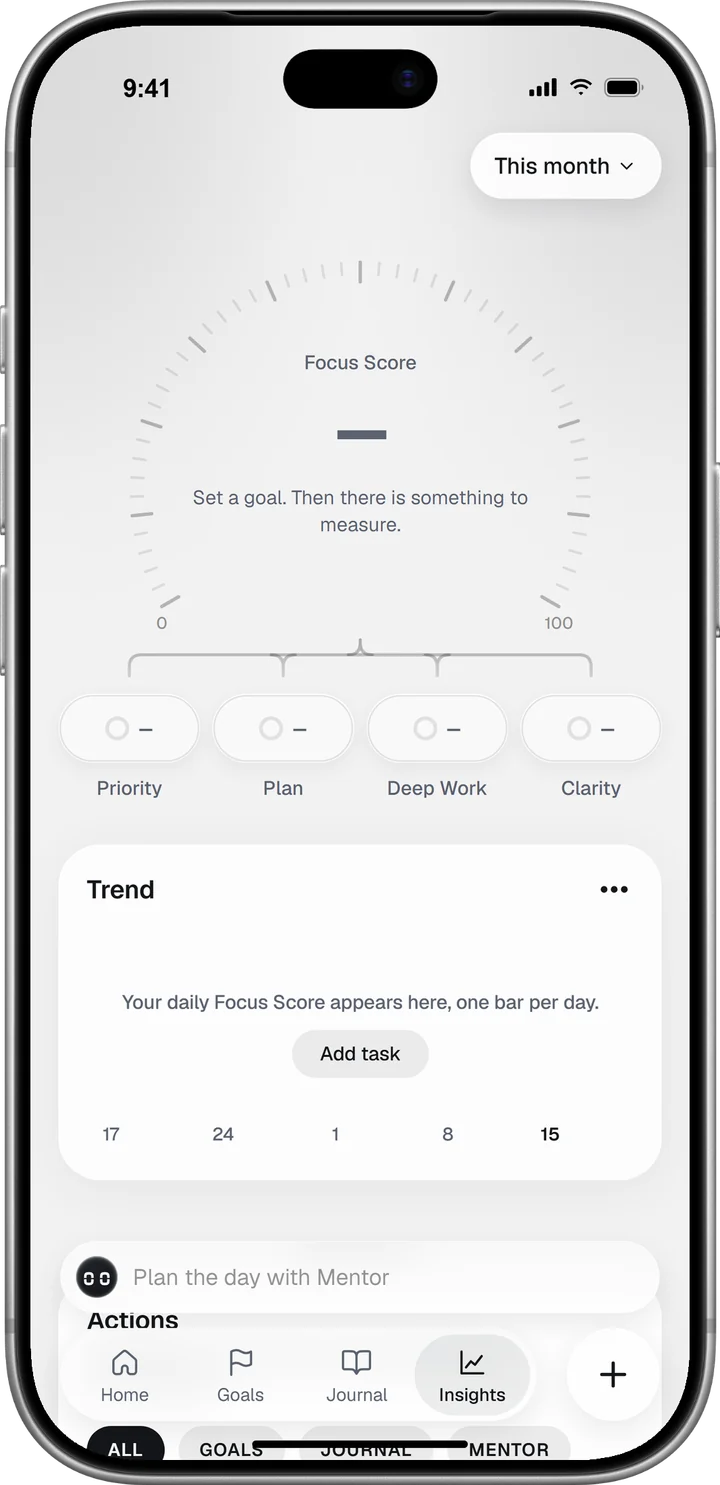
The four parts and their weights
Priority alignment (30%) weighs the tasks you closed by their goal’s priority. Plan execution (30%) compares them with what was scheduled for today. Deep work (25%) counts the minutes you run on the Timer or the Stopwatch, and Mental clarity (15%) is your answer to “How clear is your thinking?” in that day’s Today’s Read.
The exact rules for each part, from the priority weights to the 90-minute deep-work target, are in How the Focus Score is calculated.
Why a missing part does not count as zero
A part with no data is left out, and the parts that were measured share its weight. The score never fills a gap with a guess.
Here is Ada’s Thursday, 15 October, worked through:
| Part | Value | Weight | Points |
|---|---|---|---|
| Priority alignment | 82 | 30% | 24.6 |
| Plan execution | 76 | 30% | 22.8 |
| Deep work | 79 | 25% | 19.75 |
| Mental clarity | 71 | 15% | 10.65 |
| Focus Score | 77.8, shown as 78 |
If Ada had skipped Today’s Read, clarity would have been left out. The other three parts would then share all of the weight, at about 35, 35 and 29 percent, and her score would have been 79.
That makes the number fair to an open or unusual day. A score built from one or two parts still says less than one built from four, so look at which capsules were counted before you compare two days.
Check the arithmetic in the score sheet
Tap the dial to open the Focus Score sheet, or tap a capsule to open it on that part. Each row gives a part’s value, the weight it carried today and the points it added.
Rows are rounded one by one, which is why Ada’s 25, 23, 20 and 11 add up to 79 against a score of 78. What else the sheet shows is in How the Focus Score is calculated.
Read the trend
The Trend card under the dial has one bar per day for the timeframe you chose, with today highlighted. Above the bars, one line compares the latest settled day with your usual, for example “Yesterday was right on your usual.”
The average under the chart counts settled days only. A day you never opened, or a day with nothing to measure, is a gap in the chart.
On This week, the dial also shows the change against last week: your last seven scored days against the seven before them. It appears once each group has at least three days. The three-dot button on the Trend card opens How it works.
Move the score by changing what it measures
The score follows the inputs, so change those and leave the number alone.
Give your one or two most important goals Priority 1 and Priority 2. If you are unsure which goals deserve that, the Eisenhower matrix is a quick way to sort them.
Schedule the day’s tasks for today and give the larger ones a duration with Add duration. Then Plan execution compares like with like, and a two-hour task is not worth the same as a five-minute one.
Run the Timer or the Stopwatch for the work that needs your full attention. One long block scores higher than the same minutes broken into pieces. Time blocking helps you find the slot.
Answer Today’s Read each morning, so clarity is part of the score.
What else Insights shows
Activity counts what you did in the timeframe, day by day: tasks done and goals closed, journal entries saved, and the messages you sent the Mentor, the Briefs you added to your goals and the Today’s Reads you answered. The chips All, Goals, Journal and Mentor show one area at a time, and on All the card also compares the total with the previous period.
Trajectory starts with one row, the read for your timeframe, such as This week’s read. Tap it for the full trajectory read. Beside it, one tile shows how far the forecast can be trusted, as a percentage and the word Forming, Reliable or Sharp. The other shows which of your three drivers (Execution, Focus and Recovery) moves your trajectory most. On This year it looks at the last 90 days.
Trajectory takes seven days to calibrate. Before its first read it needs a scheduled task on at least 7 of the last 14 days and a Today’s Read on at least 3 days. Until then its row says what is still missing, for example “Your score needs 7 more days with tasks.”
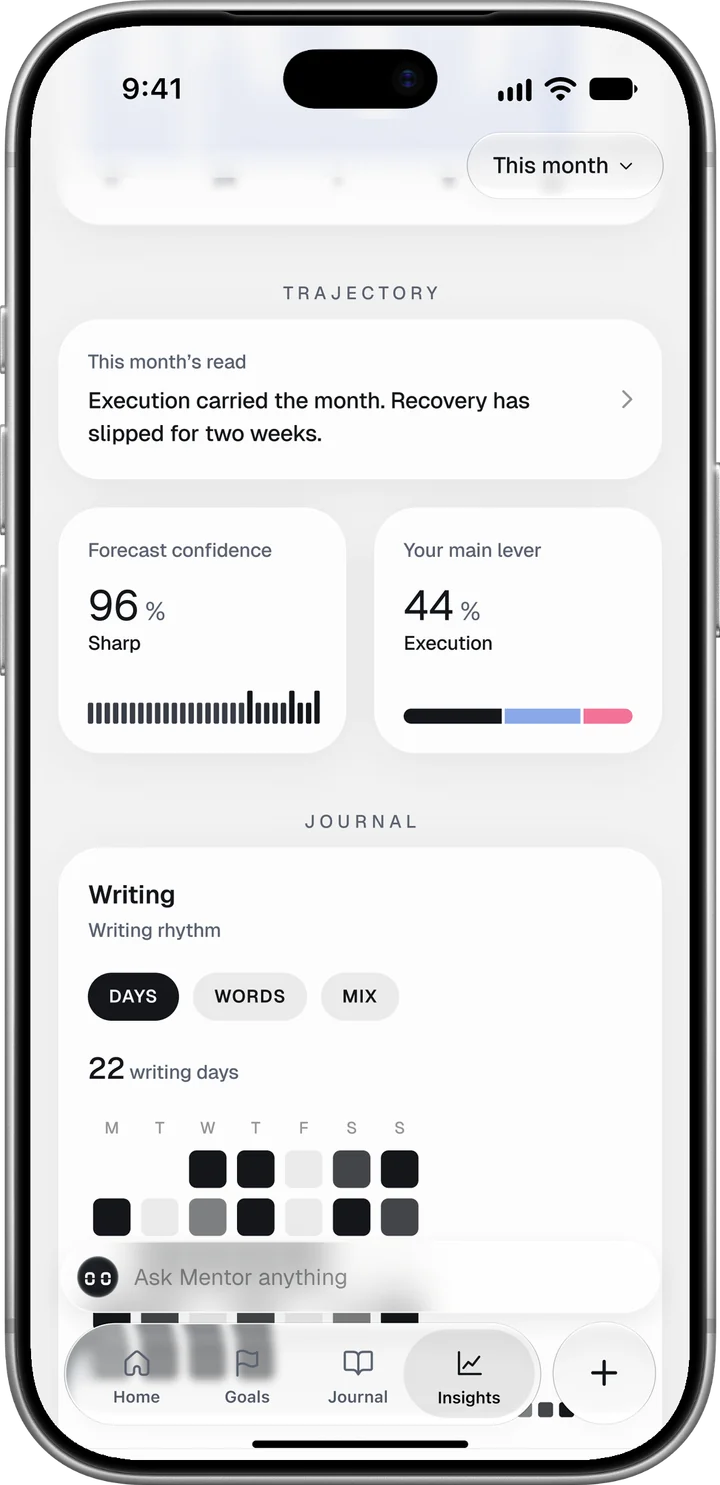
Journal shows the days you wrote, the words per day and the mix of entry types, plus a Breakdown of your check-in answers. More in the Journal guide.
Health shows your average sleep per night for the timeframe once you connect Apple Health or Health Connect. It shows the hours as recorded, with no score and no comparison to a norm.
To act on what you see, take it into your weekly planning. Goals and the weekly review shows where that happens in the app.




